
Every "best Mac transcription app" list treats the job as one problem. It is actually three: transcribing files you already have, recording meetings as they happen, and dictating text with your voice. Pick a tool built for the wrong one and you will fight it forever.
We compared the 5 native Mac tools people actually use — TranscribeNext for Mac, MacWhisper, Superwhisper, Apple's built-in Voice Memos, and Otter.ai — across privacy, engines, speaker labels, languages and price. This guide matches one app to your exact use case in under two minutes.
Jump to any section:
- TL;DR: The right app in 30 seconds
- Comparison table: 5 Mac apps
- What is the best Mac app to transcribe audio?
- How do I transcribe audio on a Mac?
- Best offline app for private transcription
- Best free Mac transcription app
- Does macOS have built-in transcription?
- Most accurate Mac transcription app
- What AI models it uses
- How fast is it?
- Disk & RAM needed
- Transcribe with speaker names
- Best app to record and transcribe meetings
- Which meeting apps it detects
- MacWhisper vs Superwhisper
- Multiple languages and translation
- How much does it cost?
- How to choose in 3 questions
- FAQ
TL;DR: The right app in 30 seconds
The best Mac app to transcribe audio depends on the job:
The rest of this guide explains why each one wins its category and where it falls short.
Comparison table: 5 Mac apps to transcribe audio
Most Mac transcription tools do only one job. Compare by what you actually need to do:
| App | Files | Meetings | Dictation | Processing | Speakers | Price |
|---|---|---|---|---|---|---|
| TranscribeNext for Mac Best overall | Yes | Yes, no bot | Yes | On-device & cloud | Up to 10, cross-meeting | Free; from €8.33/mo |
| MacWhisper | Yes | Limited | No | On-device | Yes (Plus) | Free tier; ~€59 one-time |
| Superwhisper | Limited | No | Yes | Local + cloud | No | Free; €8.49/mo or €249 lifetime |
| Apple Voice Memos / Notes | Yes | No | Yes | On-device | No | Free (macOS 15+) |
| Otter.ai | Yes | Yes, adds bot | No | Cloud only | Yes | Free tier; paid plans |
Rule of thumb: pick TranscribeNext for Mac if you want files, meetings and dictation in one app; pick a single-purpose app (MacWhisper, Superwhisper, Apple Voice Memos) if you only ever do one of those tasks.
What is the best Mac app to transcribe audio?
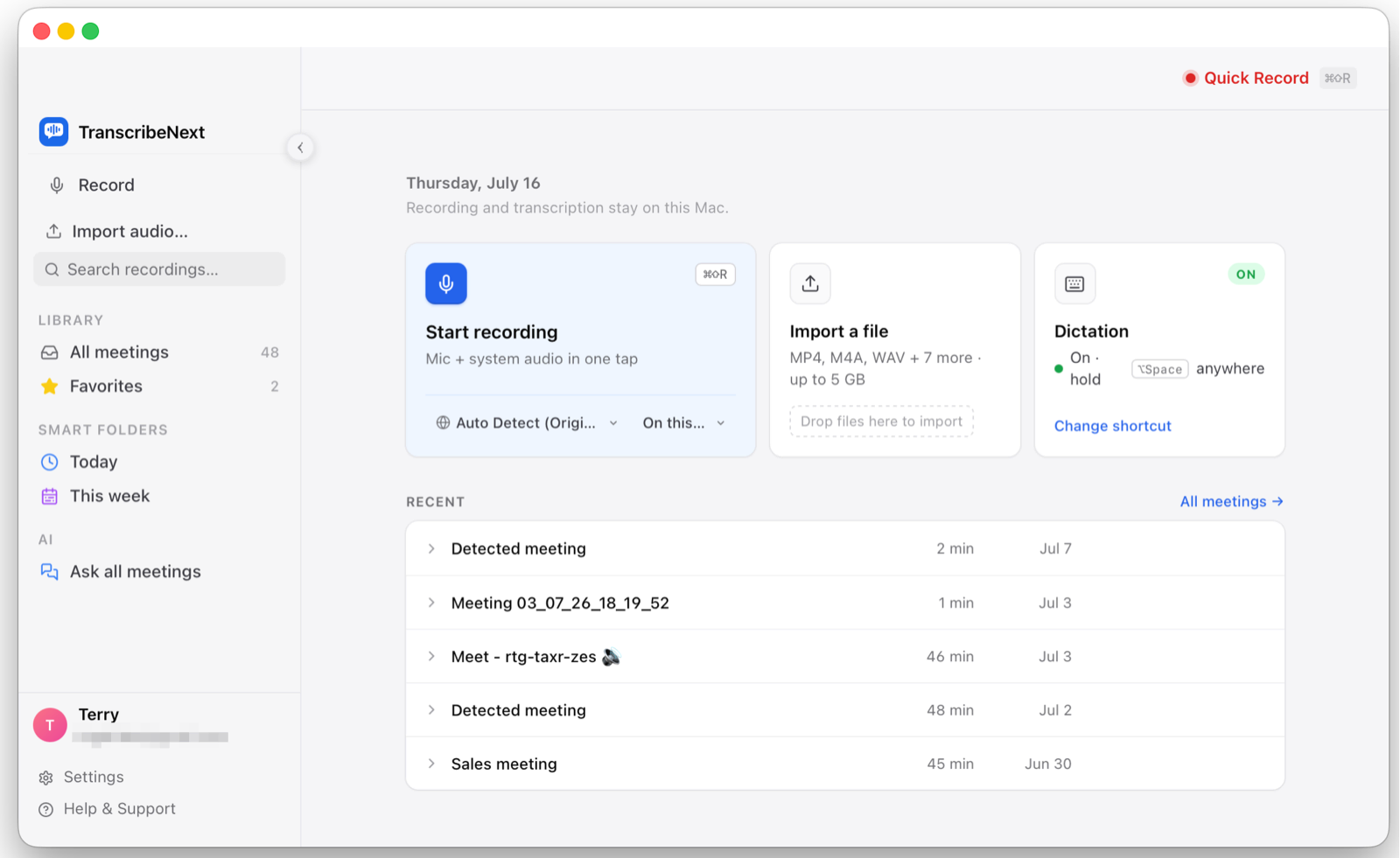
For most people the best Mac app to transcribe audio in 2026 is TranscribeNext for Mac, a native Apple Silicon app that does what rivals split across 3 separate tools: it transcribes drag-and-drop files, records Zoom, Teams, Meet, Webex, Slack and Discord meetings without joining as a bot, and turns live speech into text by dictation. It ships two on-device engines — OpenAI Whisper and NVIDIA Parakeet — that run locally for privacy, or switches to cloud transcription for tough audio. It labels up to 10 speakers, recognizes the same speaker across meetings, and writes AI summaries on-device. The exception: if you only ever drag in files and want a one-time purchase, MacWhisper is simpler.
How do I transcribe audio on a Mac?
You can transcribe audio on a Mac in 4 steps, and most tools finish in a few minutes:
Only Apple's basic Voice Memos ships pre-installed, so step 1 — choosing the right app — matters most. New to Mac transcription? See our guide to transcribing audio files and the best transcription software roundup.
What is the best offline Mac app to transcribe audio privately?
For full privacy the best offline Mac app is TranscribeNext for Mac, because its default mode keeps everything on-device — transcription (Whisper or Parakeet), speaker labeling, and even AI summaries run locally, with audio never uploaded. It bundles small on-device language models (Qwen and Gemma) so summaries are generated on your Mac, not a server. When you need maximum accuracy on hard audio you can opt into cloud transcription per recording. MacWhisper and Apple Voice Memos are also fully local. The privacy edge over cloud-only tools like Otter: on-device capture never uploads recordings and adds no visible bot to calls.
What is the best free Mac app to transcribe audio?
There are 3 genuinely free ways to transcribe audio on a Mac. Apple Voice Memos and Notes are 100% free and built into macOS 15 Sequoia and later on Apple silicon — no install, no account. TranscribeNext for Mac has a free plan (3 recordings a day) that transcribes on-device in the default local mode with no credit card — speaker labeling and unlimited use are reserved for Plus. MacWhisper's free tier runs smaller Whisper models locally with no file-length limit. Free tiers cap daily recordings, minutes or features, so use them to test accuracy before upgrading.
Does macOS have built-in audio transcription?
Yes — since macOS 15 Sequoia, both the Voice Memos and Notes apps transcribe audio for free on any Mac with Apple silicon. Record directly, or drag in an existing M4A (AAC) file, then switch from the waveform to a text transcript you can search, copy, and click to jump to any word. Limitations: it works best in English, is not available in every country, cannot label speakers, cannot record meetings, and Voice Memos will not import MP3 or WAV directly. For speaker labels, meeting recording, dictation or exports, a full app like TranscribeNext for Mac is better.
What is the most accurate Mac transcription app?
Modern on-device Mac transcription hits 95 to 99 percent accuracy on clear audio, with the model mattering more than the app. TranscribeNext for Mac is the most flexible because it runs OpenAI Whisper (best multilingual accuracy, up to the large-v3 model) and NVIDIA Parakeet (up to 10 times faster for English) on-device, and can switch to cloud transcription for heavy accents or background noise. MacWhisper matches this locally with large Whisper models. Every tool falls to roughly 80 to 90 percent on noisy phone audio. To maximize accuracy: use a larger model or the cloud engine, record close to the mic, and cut background noise.
What AI models does TranscribeNext for Mac use?
TranscribeNext for Mac ships 14 on-device transcription models — 2 NVIDIA Parakeet engines and 6 OpenAI Whisper sizes (each in a full and a smaller quantized build) — plus an optional cloud engine. You choose the speed/accuracy trade-off; every model runs locally on Apple Silicon.
| Model (in-app) | Download | Word Error Rate | Best for |
|---|---|---|---|
| Parakeet v3 "Ultra Fast" (int8) | 670 MB | 6.34%* | Fastest, 25 languages |
| Parakeet v2 "Fast" (int8) | 661 MB | — | Fast English |
| Whisper small | 466 MB | 3.4%† | Light, accurate enough |
| Whisper medium | 1.5 GB | 2.9%† | Balanced |
| Whisper large-v3-turbo | 1.6 GB | ~2.7%† | Near-best, faster |
| Whisper large-v3 | 2.9 GB | 2.5%† | Best accuracy |
Each Whisper size also has a smaller quantized (q5) build — for example large-v3 drops from 2.9 GB to about 1.1 GB. On-device AI summaries and translation run on bundled models: Qwen 3.5 2B (1.2 GB, recommended), Qwen 3.5 0.8B (533 MB, any Mac) or Gemma 4.
*Parakeet v3 average WER on the HuggingFace Open ASR Leaderboard (25-language, multi-domain). †Whisper WER on LibriSpeech test-clean (clean English); real-world noisy audio scores higher.
How fast is Mac transcription?
On Apple Silicon, on-device transcription runs many times faster than real time. With the NVIDIA Parakeet engine a Mac transcribes 1 hour of audio in roughly 30 seconds to a few minutes depending on the chip — one 68-minute file finishes in about 62 seconds, and CoreML benchmarks reach up to ~150× real time on an M-series Mac. OpenAI Whisper is slower but still beats real time on the larger models. Live meeting captions appear within about 1–2 seconds. Because everything is local there is no upload or queue wait, which a cloud service always adds.
How much disk and RAM does local Mac transcription need?
TranscribeNext for Mac needs an Apple Silicon Mac (M1 or later), macOS 14 Sonoma or later, and about 8 GB of RAM. Model downloads range from 75 MB (Whisper tiny) to 2.9 GB (Whisper large-v3); the Parakeet engines are 661–670 MB. On an 8 GB Mac, Whisper large-v3-turbo (1.6 GB) or Parakeet is the sweet spot; 16 GB comfortably runs the full large-v3 model plus the Qwen 3.5 2B summary model. The app uses roughly 500 MB to 3 GB of storage depending on which models you keep, and works fully offline once they are downloaded.
How do I transcribe audio with speaker names on a Mac?
Use an app with speaker diarization, which automatically labels who spoke — TranscribeNext for Mac detects up to 10 speakers on-device and color-codes each segment with no manual setup. You can rename each label (for example "Host" or "Guest"), and it works for virtual meetings and in-person recordings alike. Uniquely, TranscribeNext also builds cross-meeting voiceprints: a person you named in one meeting is recognized automatically in the next, with no enrollment step — so recurring calls, interview series and podcasts keep consistent names. TranscribeNext for Mac and MacWhisper Plus support speaker labeling; Apple Voice Memos and dictation-only apps do not. In TranscribeNext, diarization is a Plus / Premium feature.
What is the best Mac app to record and transcribe meetings?
For meetings the best Mac app is TranscribeNext for Mac, because it records Zoom, Microsoft Teams, Google Meet, Webex, Slack, Discord and FaceTime without adding a bot — it detects when a call grabs your microphone, captures system audio directly, and transcribes live during the call. It then labels up to 10 speakers and writes summaries and action items with an on-device AI, and can keep all of it local. Otter.ai also records meetings but uploads audio to the cloud and joins as a visible bot. For confidential calls where nothing can be uploaded, an on-device recorder like TranscribeNext for Mac is the safer choice.
Which meeting apps does it auto-detect?
TranscribeNext for Mac auto-detects 7 native meeting apps — Zoom, Microsoft Teams, Webex, Slack, Discord, FaceTime and RingCentral — plus browser calls in Chrome, Edge, Brave, Arc, Safari and Firefox (for example Google Meet and the Zoom web client). It works by noticing when an app takes over your microphone, so it never joins as a bot and needs no meeting link. Detection can be set to Off, Ask, or Auto-record. This mic-ownership approach is why recording stays private and invisible to other participants.
MacWhisper vs Superwhisper: which should I choose?
They solve two different problems, so the choice is about files versus speech. MacWhisper is a file-transcription app — drag in existing audio or video and get a full transcript, ideal for interviews, lectures and podcasts. Superwhisper is a dictation app — it runs in the background and turns your live speech into text inside any app, cleaning filler words as you go. Pick MacWhisper for recordings you already have; pick Superwhisper to write by voice. If you want files, dictation *and* meeting recording with speaker labels in one app, TranscribeNext for Mac does all three, which neither MacWhisper nor Superwhisper does alone.
Can I transcribe audio in multiple languages on a Mac?
Yes — the top Mac transcription apps each support around 100 languages, including Spanish, French, German, Chinese, Japanese, Arabic, Hindi, Portuguese and Russian. TranscribeNext for Mac transcribes with OpenAI Whisper and multilingual Parakeet on-device, and can also translate a finished transcript into 29 languages locally with its bundled AI, or in the cloud. MacWhisper and Superwhisper likewise cover 100+ languages. The exception is Apple's built-in Voice Memos, which works best in English and is not available in every region. For reliable non-English, mixed-language or translated output, a dedicated app beats the built-in tools.
How much does Mac transcription software cost?
Mac transcription pricing ranges from €0 to about €250, split between free, one-time and subscription models (see TranscribeNext pricing):
| App | Free tier | Paid plan | Model |
|---|---|---|---|
| Apple Voice Memos / Notes | Fully free | — | Built into macOS |
| TranscribeNext for Mac | Yes · 3/day, no card | Plus €8.33/mo · Premium €12.49/mo | Subscription (billed yearly) |
| MacWhisper | Yes · small models | ~€59 one-time (lifetime) | One-time purchase |
| Superwhisper | Yes | €8.49/mo or €249.99 lifetime | Subscription / lifetime |
A one-time app like MacWhisper is cheapest long-term if you only transcribe files, while TranscribeNext for Mac's paid plans (Plus at €8.33/month or €99.99/year, Premium at €12.49/month or €149.99/year) replace three tools — file transcription, meeting recording and dictation — and unlock speaker labels, cross-meeting voiceprints and AI summaries. Apple Voice Memos stays free forever but has no speaker labels, meetings or exports. Superwhisper's €249.99 lifetime license breaks even against its monthly plan at roughly month 29.
How to choose the right Mac transcription app
Answer 3 questions to narrow it to one app:
For most users who want files, meetings, dictation, speaker labels and a choice of on-device or cloud in one native app, start with TranscribeNext for Mac's free plan; if you only need drag-and-drop file transcription, start with MacWhisper.
FAQ
Is TranscribeNext for Mac fully offline? In its default local mode, transcription, speaker labeling and AI summaries all run on-device and your audio is never uploaded. Cloud transcription is available as an opt-in per recording when you want maximum accuracy on hard audio.
Which Mac is required? TranscribeNext for Mac runs on any Apple Silicon Mac (M1 or later) on macOS 14 Sonoma or later. Apple Voice Memos transcription requires macOS 15 Sequoia and Apple silicon.
Can it transcribe existing audio and video files? Yes. It imports MP3, M4A, WAV, MP4, MOV, FLAC, MKV and more, extracting audio from video automatically, and exports to DOCX, PDF, SRT, VTT, TXT and Markdown.
*Requirements and pricing verified July 2026. Vendor terms change frequently — confirm current details on each vendor's page before purchase.*
On formats specifically: most Mac recorders write M4A, covered in M4A transcription; screen recordings usually come out as WebM to text or MOV.