
Dictation software for Mac turns speech into text system-wide, and the options differ on three things: AI-driven accuracy (which speech model runs underneath), automatic text formatting (whether filler words and punctuation are cleaned up for you), and privacy (whether your voice is processed on-device or in the cloud). Price follows from that last choice — on-device tools are frequently free, cloud polish is usually a subscription.
Beyond those basics, four measurable things decide which app you keep: how long a single take can be, how fast text appears, whether your voice leaves the Mac, and what it costs every month.
We compared the 8 dictation tools Mac users actually reach for — TranscribeNext for Mac, Apple Dictation, Wispr Flow, Superwhisper, Voicy, MacWhisper, Voibe, and FluidVoice — using published benchmarks and the shipping specs of each engine rather than marketing copy. Below you will find the exact shortcut, latency, and privacy behavior for each job.
- TL;DR: the right app in 30 seconds
- Best dictation software for Mac
- Is Apple Dictation good enough?
- How to turn on dictation
- Dictating with the Fn key
- Best offline & private option
- Voibe and FluidVoice explained
- Latency: how fast text appears
- How accurate is Mac dictation?
- Dictation vs typing speed
- Which app types into any app
- Wispr Flow vs Superwhisper
- What actually leaves your Mac
- Pricing compared
- Strengths and limitations of each app
- How to choose
- FAQ
TL;DR: the right Mac dictation app in 30 seconds
The best dictation software for Mac depends on the job:
What is the best dictation software for Mac?
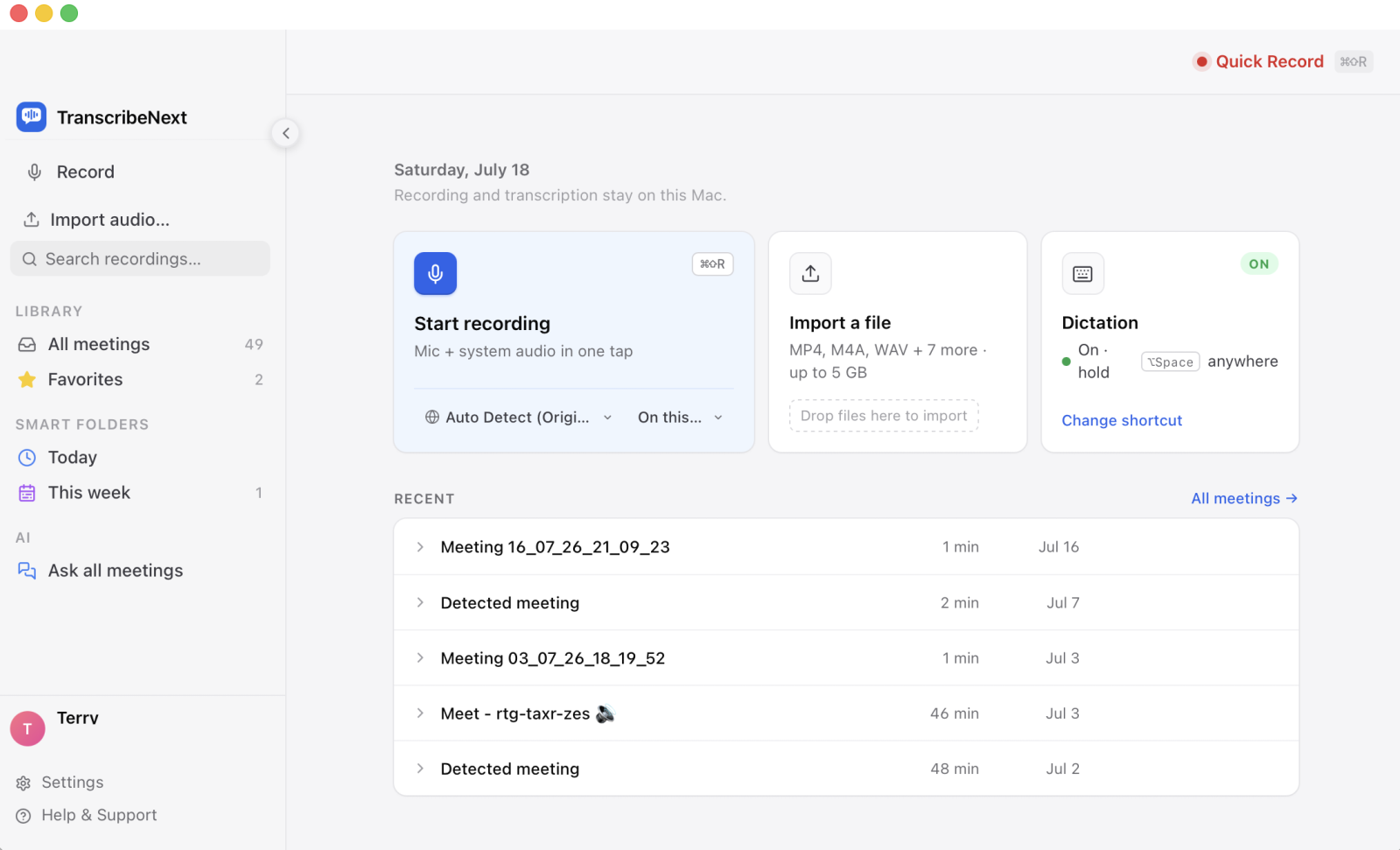
For most people the best dictation software for Mac in 2026 is TranscribeNext for Mac. Voice typing is currently included free on every plan — including the free one — because the speech model runs on your Mac rather than a server, so there is no per-word cost to pass on. It types system-wide into any app, handles single takes up to 5 minutes, and needs no account for the local engine.
That does not make the others wrong. Apple Dictation is still the fastest thing to switch on, Wispr Flow still produces the most polished business writing, and Superwhisper is still the most configurable. The table below matches each to the job it wins.
| App | Best for | Standout feature | Runs | Max take | Price |
|---|---|---|---|---|---|
| TranscribeNext for Mac | Everyday voice typing, free | Free on-device voice typing on every plan, plus meetings and file transcription in the same app | On-device (cloud optional) | 5 min | Dictation free |
| Apple Dictation | Quick built-in bursts | Built into macOS; zero setup | On-device | ~60 sec | Free |
| Wispr Flow | Polished business writing | Cloud AI strips filler words and fixes formatting as you speak | Cloud | Long | ≈€15/mo |
| Superwhisper | Power users, custom modes | Deep customisation: local models, custom modes and templates | On-device | Long | €8.49/mo · €249.99 life |
| Voicy | Cross-app dictation | Lifetime licence option instead of a subscription | Cloud | Long | ≈€8.49/mo · €260 life |
| MacWhisper | Audio files, dictation second | Turns pre-recorded files into text locally, no length limit | On-device | Long | Free · ≈€59 once |
| Voibe | Long-form writing, privacy | On-device mode built for hour-long sessions without a time-out | On-device or zero-retention cloud | Long | Paid plans |
| FluidVoice | Free, open-source automation | Open-source models replace paid AI dictation at zero cost | On-device | Long | Free / open-source |
Is Apple's built-in dictation good enough?
For short bursts, yes. Apple Dictation is free, ships with macOS, and works offline for many languages — for a search box or a one-line reply it is genuinely hard to beat.
Two limits push people to a dedicated app. First, length: continuous built-in dictation stops at roughly 60 seconds per take, which is fine for a sentence and painful for a paragraph. Second, cleanup: Apple types what you said, including every "um", false start and self-correction, with no filler-word removal or paragraph formatting. You also cannot choose a different speech model.
If you dictate whole emails, notes or documents, that is exactly where a third-party app earns its place — longer takes, better models, and automatic cleanup.
How do I turn on dictation on a Mac?
To enable Apple's built-in dictation:
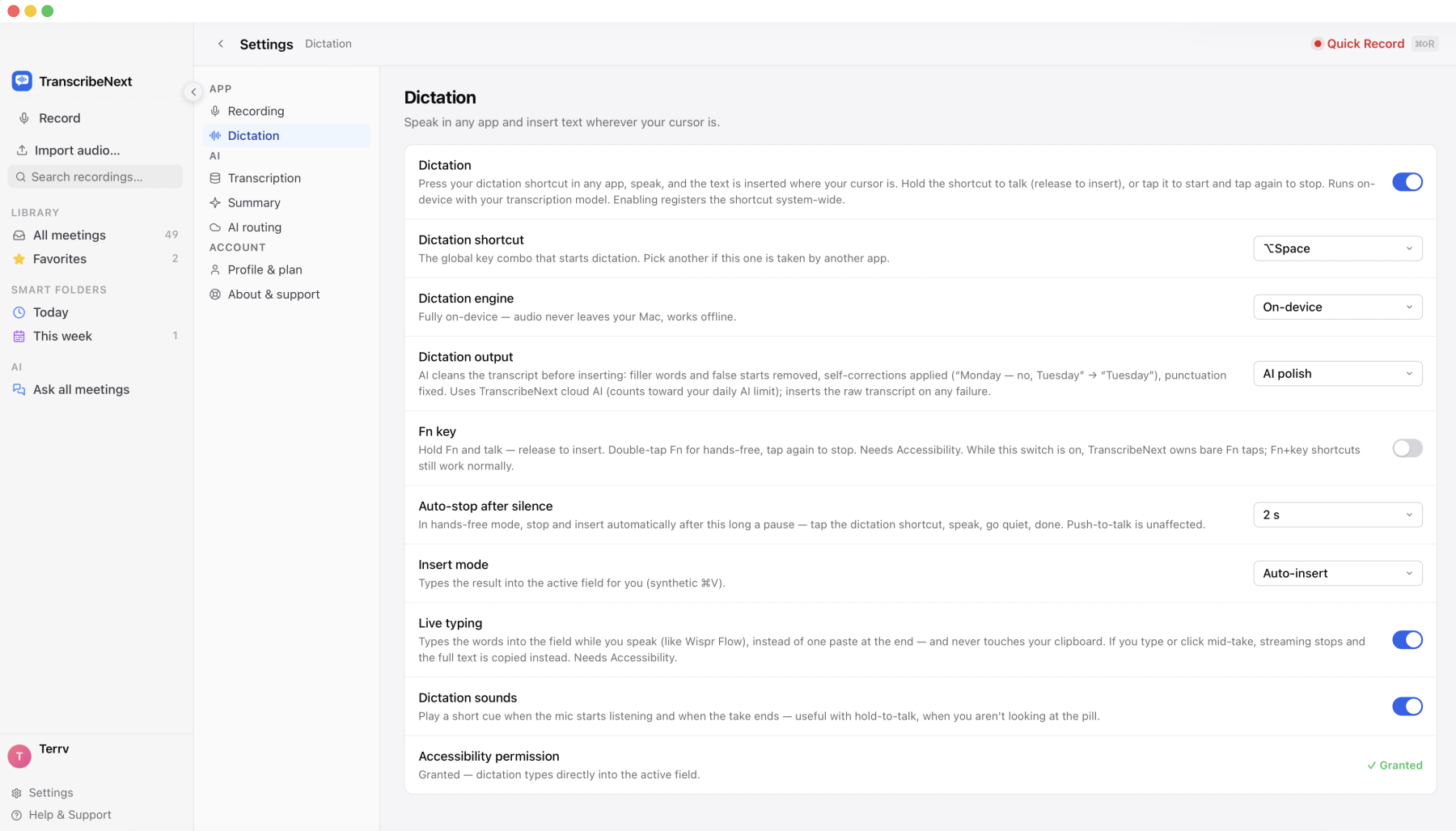
Third-party apps register their own global shortcut instead. In TranscribeNext for Mac the default is ⌥Space, with four preset combos available (⌥Space, ⌃⌘D, ⌃Space, ⌃⌥Space) so you can dodge collisions with Alfred or Raycast. The same key does both styles: hold it for more than 400 ms and it behaves as push-to-talk, releasing to insert; tap it and it toggles hands-free until you tap again. Esc cancels a take and inserts nothing.
Can I dictate with the Fn key like Wispr Flow?
Yes. TranscribeNext for Mac can bind the Fn (globe) key — the gesture Wispr Flow made popular — as a second trigger alongside ⌥Space. Hold Fn and talk, release to insert; double-tap Fn within 400 ms to go hands-free, then tap once to stop.
Two things are worth knowing. It ships switched off: enable it in Settings → Dictation and grant Accessibility, because the app has to watch the key globally. And it does not hijack your keyboard — while the switch is on TranscribeNext claims only *bare* Fn taps, so Fn+F1 brightness, function keys and the emoji picker keep working normally. Unlike Wispr Flow's version, the recognition behind the gesture runs on your Mac, so it needs no account and no internet.
What is the best offline and private dictation app for Mac?
TranscribeNext for Mac dictates fully offline. The default engine is NVIDIA Parakeet TDT 0.6B v3 in int8 (a 670 MB download) running on Apple Silicon; you can switch to OpenAI Whisper large-v3-turbo instead. With the on-device engine, audio never leaves the Mac, and dictation text is never written to a database — only the last result is kept in memory so you can re-copy it, and it is gone when the app restarts.
Superwhisper, MacWhisper and Voibe also run Whisper locally, so all four are legitimate offline choices. Apple Dictation is on-device for many languages. Wispr Flow and Voicy are cloud services by design.
One honest caveat that most comparison articles skip: AI cleanup is usually not local. Filler-word removal and reformatting need a language model, and in TranscribeNext for Mac that step sends the *text* (never the audio) to a cloud model and requires you to be signed in. Switching the output setting to Raw transcript keeps the entire pipeline on your Mac.
What about Voibe and FluidVoice?
Two newer names come up constantly in Mac dictation shortlists, and both are local-first. We have not benchmarked either, so the descriptions below reflect their published documentation rather than our own measurements.
Voibe targets long-form writing. Its selling point is a fully on-device mode that does not time out, so an hour-long dictation session runs without the cut-offs that end an Apple Dictation take at about 60 seconds, plus a zero-retention cloud mode you can switch to when you want more accuracy. The trade-off is storage: the local model downloads take up noticeable disk space, the same tax every on-device tool pays (TranscribeNext for Mac's Parakeet engine is a 670 MB download; Whisper large-v3 is 2.9 GB). It is a paid product with plans rather than a free tier.
FluidVoice is the open-source option. It is community-built and free, running open-source speech models locally to replicate what paid AI dictation apps charge for: a hotkey that types into any application, plus voice commands for controlling the desktop. The catch is installation — it is distributed through Homebrew and installed from the Terminal with `brew install --cask fluidvoice`, which rules it out for anyone who does not want a command line in their setup, and community projects carry no support guarantee.
Both are legitimate picks if privacy is your first requirement. The practical difference from TranscribeNext for Mac is scope: neither records meetings or transcribes existing audio files, so if you need dictation *and* recordings in one place you would be running two apps.
Latency: how fast does the text actually appear?
This is the number nobody publishes, so here are the real ones from TranscribeNext for Mac:
For comparison, published figures put Superwhisper's round trip at roughly 1–2 seconds per take and cloud tools such as Wispr Flow at about 200 ms of network latency plus processing — cloud can feel snappier on short phrases, but it stops working on a plane.
How accurate is Mac dictation?
Accuracy is a property of the model, not the app wrapper — most Mac dictation apps run the same two families of engine, so the honest comparison is between models:
| Engine | Download | Word Error Rate | Benchmark |
|---|---|---|---|
| NVIDIA Parakeet TDT 0.6B v3 | 670 MB | 6.34% | Open ASR Leaderboard, 25 languages, multi-domain |
| OpenAI Whisper large-v3 | 2.9 GB | 2.5% | LibriSpeech test-clean, clean English |
| OpenAI Whisper medium | 1.5 GB | 2.9% | LibriSpeech test-clean |
| OpenAI Whisper small | 466 MB | 3.4% | LibriSpeech test-clean |
Different benchmarks are not directly comparable: LibriSpeech test-clean is clean read English, while the Open ASR Leaderboard mixes 25 languages and harder domains. Real-world dictation with background noise scores worse than both.
The practical takeaway: on a decent headset in a quiet room, every modern engine here lands in the same ballpark, and a better microphone buys more accuracy than switching apps. Where they differ is what happens *after* recognition — punctuation, casing and filler removal.
Is dictating faster than typing?
By roughly three to four times. Comfortable speech runs at about 150 words per minute, while average typing sits near 40 words per minute — so a 300-word email takes about two minutes to speak and closer to seven and a half minutes to type.
That advantage evaporates if you spend the saved time fixing "um", missing commas and run-on paragraphs, which is why automatic cleanup is the feature that actually decides whether dictation sticks. In TranscribeNext for Mac the cleanup step removes filler words and false starts, applies your self-corrections ("Monday — no, wait, Tuesday" becomes "Tuesday"), fixes punctuation and capitalisation, and splits speech into sentences. It never translates, summarises or invents content, and it is guarded: if the model returns more than 2.2× your input, drops below 30% of it, or mangles a number, URL or email, the raw transcript is used instead.
Which dictation app types into any app?
All of the third-party apps here are system-wide — the difference is *how* they insert text, which decides where they break.
TranscribeNext for Mac uses two mechanisms. Live typing (default) sends the words as synthetic keystrokes while you speak, so text lands in the app you are already using — and if you start typing or clicking mid-take, it detects the interruption and steps aside rather than fighting you. The fallback is a clipboard-and-paste insert that takes a full-fidelity snapshot of your clipboard first and restores it afterwards, so a screenshot or a link you had copied is not destroyed.
Two macOS behaviours matter here, and are worth knowing whichever app you pick:
Wispr Flow vs Superwhisper: which should you choose?
It comes down to cloud polish versus local control.
Wispr Flow is cloud-first: your speech goes to its servers and comes back as clean, formatted prose. It is the strongest option for email and chat where tone matters, and the weakest if you work offline or handle confidential material — and it carries a subscription of roughly €15 a month.
Superwhisper is local-first and built for Mac power users: on-device Whisper models, custom modes and shortcut-driven workflows, with a free tier, €8.49 a month or a €249.99 lifetime licence. Published latency is around 1–2 seconds per take.
TranscribeNext for Mac sits deliberately between them: the recognition runs on-device like Superwhisper, the cleanup is as automatic as Wispr Flow's, and voice typing costs nothing on any plan. It is also the only one of the three that records and transcribes your meetings and audio files in the same app.
What actually leaves your Mac?
Privacy claims in this category are vague, so here is the precise breakdown for TranscribeNext for Mac:
Apple Dictation processes many languages on-device. Wispr Flow and Voicy are cloud services. Superwhisper, MacWhisper and Voibe process locally.
How much does Mac dictation software cost?
Dictation pricing runs from €0 to about €15 a month — and unusually for this category, the free options are genuinely usable.
Over a year, a €15/month subscription is about €180 — worth it if cloud polish is your bottleneck, and hard to justify if a local model already types cleanly. See TranscribeNext pricing for the full plan comparison.
Strengths and limitations of each app
Every app here wins somewhere and loses somewhere. The short version:
How to choose in 30 seconds
Dictation is the rare productivity feature with an immediate payback: at 150 words per minute versus 40, the tool pays for itself in the first week. Start with the free option that matches your privacy needs, and only pay when you hit a wall.
FAQ
What is the best dictation software for Mac? For most people the best dictation software for Mac in 2026 is TranscribeNext for Mac: voice typing is currently free on every plan, runs on-device with NVIDIA Parakeet so audio never leaves your Mac, works system-wide in any app, and handles takes up to 5 minutes instead of Apple's 60 seconds. Apple Dictation remains the best zero-install option, Wispr Flow is the strongest cloud AI polish, and Superwhisper is the deepest tool for power users who want local models plus custom shortcuts.
Is Apple's built-in dictation good enough? For short bursts, yes — Apple Dictation is free, built into macOS, and works offline for many languages. Its practical limits are length and cleanup: continuous dictation is capped at around 60 seconds per take, it does not remove filler words or reformat sentences, and it has no AI polish. If you dictate emails, documents or long messages, a dedicated app removes those limits.
What is the best offline dictation app for Mac? TranscribeNext for Mac dictates fully offline using NVIDIA Parakeet TDT 0.6B v3 on-device, so no audio is uploaded and nothing is stored in a database. Superwhisper, MacWhisper, Voibe and FluidVoice also run models locally. Note that any app advertising AI cleanup usually sends the text (not the audio) to a cloud model — in TranscribeNext for Mac you can switch to Raw transcript mode to keep the whole pipeline local.
How do I turn on dictation on a Mac? Open System Settings, choose Keyboard, then turn on Dictation and pick a shortcut — pressing the microphone or Function key starts Apple's built-in dictation. Third-party apps use their own global shortcut instead: TranscribeNext for Mac defaults to ⌥Space, where holding the keys is push-to-talk and a quick tap toggles hands-free dictation.
Can I use the Fn key for dictation on a Mac? Yes. TranscribeNext for Mac can bind the Fn (globe) key as a dictation trigger, the same gesture Wispr Flow popularised: hold Fn and talk for push-to-talk, or double-tap Fn within 400 milliseconds for hands-free dictation and tap once to stop. It is switched off by default and needs Accessibility permission. It only claims bare Fn taps, so Fn combined with another key — brightness, function keys or the emoji picker — keeps working as normal.
Wispr Flow vs Superwhisper: which is better on Mac? Wispr Flow is a cloud-first app: it sends speech to its servers and returns polished, formatted text, which is excellent for email and chat but requires internet and a subscription. Superwhisper is local-first for Mac power users, with on-device Whisper models, custom modes and shortcuts. Choose Wispr Flow for the cleanest formatting, Superwhisper for privacy and control. TranscribeNext for Mac sits between them: on-device dictation that is currently free on every plan, with optional cloud polish you can switch off.
How accurate is Mac dictation? Accuracy depends on the model, not the app. NVIDIA Parakeet TDT 0.6B v3 — the default engine in TranscribeNext for Mac — averages 6.34 percent word error rate on the multi-domain HuggingFace Open ASR Leaderboard, while OpenAI Whisper large-v3 reaches about 2.5 percent on clean English in the LibriSpeech test-clean benchmark. Real-world accuracy drops with background noise, heavy accents and cross-talk, so a good microphone matters more than switching apps.
Is dictation faster than typing on a Mac? Yes, by roughly three to four times. Comfortable speaking runs at about 150 words per minute while average typing is about 40 words per minute, so a message that takes two minutes to type takes about 30 seconds to say. The gap narrows if you have to fix formatting afterwards, which is why automatic punctuation and filler-word removal matter more than raw speed.
How much does Mac dictation software cost? Mac dictation ranges from free to about 15 euros a month. Apple Dictation is free, and FluidVoice is free and open-source. TranscribeNext for Mac currently includes voice typing free on every plan, including the free plan, because the model runs on your Mac. Superwhisper offers a free tier, 8.49 euros per month or 249.99 euros lifetime; Voicy is around 8.49 euros per month or 260 euros lifetime; Wispr Flow is roughly 15 euros per month; MacWhisper is a one-time licence around 59 euros; Voibe is sold as paid plans.
Sources & references: TranscribeNext for Mac (transcribenext.com/download), Apple Dictation support guide (support.apple.com), Wispr Flow (wisprflow.ai), Superwhisper (superwhisper.com), MacWhisper (macwhisper.com), HuggingFace Open ASR Leaderboard, LibriSpeech test-clean benchmark. Engine and timing figures reflect the shipping TranscribeNext for Mac build; third-party pricing and latency are the vendors' published figures and change over time.