
Virtual meeting etiquette comes down to one idea: online, everything a room does for you automatically has to be done on purpose. In a room, you can see who is about to speak, hear that someone has stopped, and notice the person who has not said a word. On a video call, you get a grid of faces, a half-second of lag and no peripheral vision. Good online meeting etiquette is just the set of habits that puts those missing cues back.

Every guide on this topic offers the same tips, and almost none of them check whether the problems they solve actually happen. So we checked. We counted what people actually say on 766 real online meetings — English-language Zoom, Google Meet and Microsoft Teams calls transcribed by TranscribeNext between December 2025 and September 2026 — and measured who speaks and for how long in the meetings where we could tell voices apart. A script did the counting; nobody read the meetings. The method is at the end of this article.
The short version: in one meeting in four, someone stops to deal with an audio or video problem out loud. In one in six, someone asks "Can you hear me?" And in meetings of three or more people, the person who talks most takes nearly half of all the talk time. The twelve rules below are aimed at exactly those moments.
12 virtual meeting etiquette tips at a glance
| # | Rule | Why it matters (our data) |
|---|---|---|
| 1 | Send an agenda with a goal — or cancel | Only 14% of meetings mention an agenda at all |
| 2 | Test audio before you join | “Can you hear me?” in 1 meeting in 6 |
| 3 | Join on time, start on time | 1 notetaker-recorded meeting in 5 opens with a minute or more of silence |
| 4 | Set up camera, light and background | Your video is the first thing people judge |
| 5 | Mute when you’re not speaking | “You’re on mute” in 1 meeting in 10 |
| 6 | Agree camera norms; say when yours is off | Cameras come up in conversation in 9% of meetings |
| 7 | Share one window, not your desktop | Screens are shared in 10% of meetings |
| 8 | Don’t hold the floor | Top speaker: 48% of talk time with 3+ people |
| 9 | Leave a beat before you speak | Speakers hand over in 0.4 s; 6% of meetings need a “sorry, go ahead” |
| 10 | Be present; use chat on purpose | “Can you repeat that?” in 9% of meetings |
| 11 | Announce any recording or AI notetaker | The recording is mentioned aloud in under 7% |
| 12 | End on time with owners and deadlines | Next steps mentioned in only 17% |
Prefer to watch? The video below shows all twelve rules in two minutes — each one broken first, then done right.
Online meeting etiquette by the numbers: what 766 real calls sound like
Etiquette advice usually starts from what feels annoying. We started from what people actually say. The chart counts the share of meetings in which each moment was said out loud at least once — so it is a floor, not a ceiling: a muted microphone that nobody pointed out does not show up.
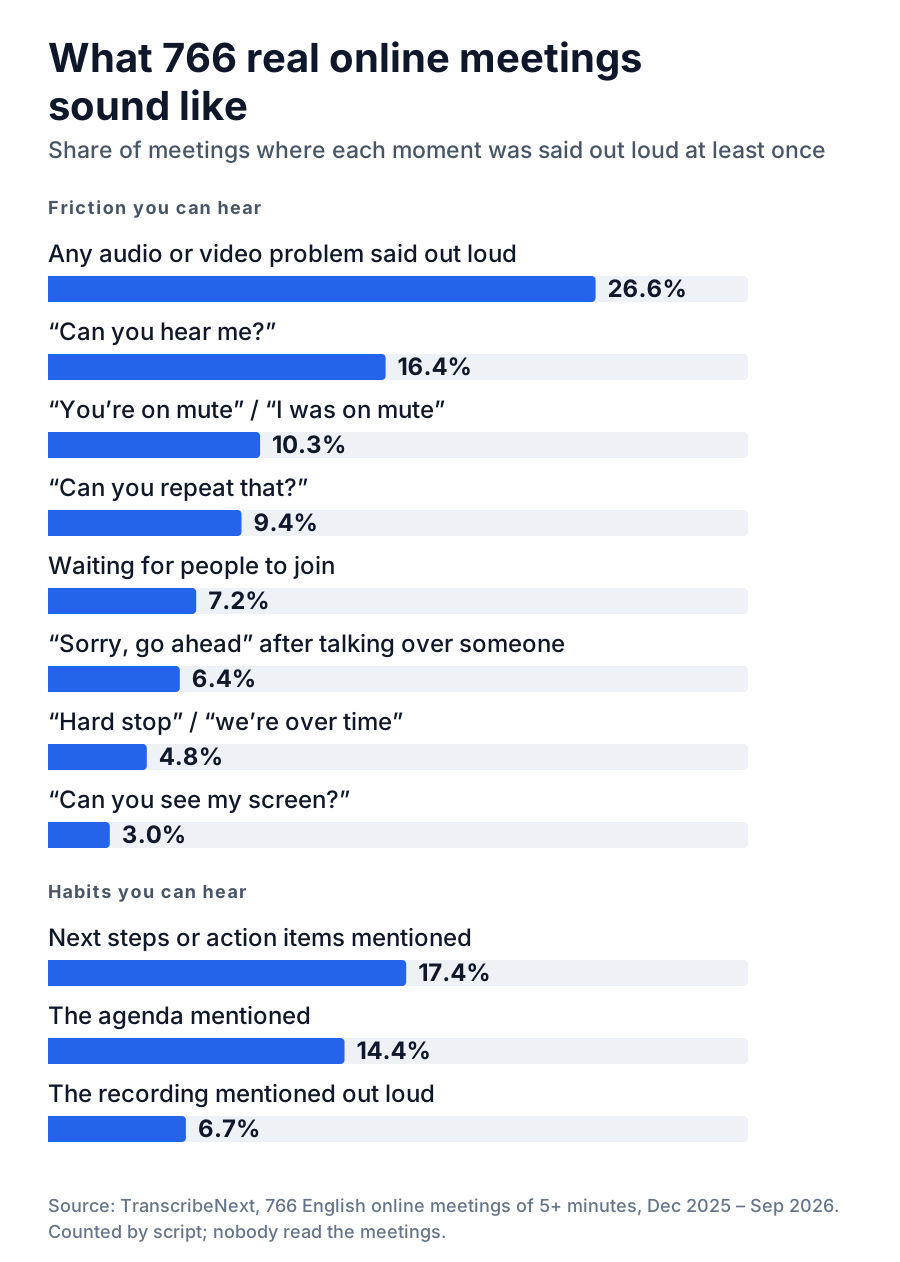
Four findings shape the rules below.
The typical meeting in our data ran 53 minutes (half ran between 34 and 72). That is a lot of time to spend asking whether people can hear you.
Before the meeting: rules 1–4
1. Send an agenda with a goal — or cancel the meeting
The best meeting etiquette starts with asking whether there should be a meeting at all. If the goal is to share information that nobody needs to discuss, a written update or a recorded walkthrough respects people’s time more than a call.
If you do meet, send a short agenda at least a day ahead (a few hours for a quick sync). It needs three things:
Only 14% of the meetings we analysed mentioned an agenda out loud. The ones that did tended to sound like this: "Can everyone see the agenda? Let’s start with item one." Saying the plan at the start takes ten seconds and turns a conversation into a meeting.
2. Test your audio and video before you join — not in the meeting
"Can you hear me?" came up in one meeting in six, and "can you repeat that?" in nearly one in ten. Both are cheap to prevent:
If it still goes wrong, say so in one line — "My audio is acting up, switching to phone, back in 30 seconds" — and do not troubleshoot live in front of everyone.
3. Join on time — and if you’re the host, start on time
Join one to two minutes early for an internal call and about five minutes early for an interview, a client meeting or anything you are presenting. That is not about appearing keen; it is so problems from rule 2 happen before the meeting instead of during it.
Hosts have the bigger job. In 7% of meetings someone said out loud that they were waiting for people to join, and in one in five meetings our notetaker joined, the first minute passed in silence (in one in eight, three minutes or more). Waiting for latecomers punishes the people who were on time. Start within two minutes of the hour, and recap for latecomers in the chat, not out loud.
If you are the late one: join muted, put "Sorry I’m late — catching up" in the chat and do not ask for a recap. If you know in advance, tell the host before the start so they do not wait for you.
4. Set up your camera, light and background
You do not need a studio. You need to be visible and not distracting:
During the meeting: rules 5–10
5. Mute when you’re not speaking — and learn the shortcut
"You’re on mute" (or "sorry, I was on mute") came up in one meeting in ten. The fix for both directions — talking while muted and making noise while unmuted — is the same: keep the microphone off by default and toggle it with the keyboard, not the mouse, so unmuting is instant.
| Action | Zoom | Microsoft Teams | Google Meet |
|---|---|---|---|
| Mute / unmute | Alt+A · ⌘+Shift+A | Ctrl+Shift+M · ⌘+Shift+M | Ctrl+D · ⌘+D |
| Hold to talk | Hold Space | Ctrl+Space · Option+Space | — |
| Camera on / off | Alt+V · ⌘+Shift+V | Ctrl+Shift+O · ⌘+Shift+O | Ctrl+E · ⌘+E |
| Raise / lower hand | Alt+Y · Option+Y | Ctrl+Shift+K · ⌘+Shift+K | Ctrl+Alt+H · Ctrl+⌘+H |
| Captions | Captions button | More → Language and speech | C |
Windows first, Mac second. Hold-to-talk may need switching on in the app’s settings (in Teams: Settings → Privacy). Shortcuts can change between app versions; Google Meet lists its current set when you press Shift+? in a call.
Hold-to-talk is the most underrated shortcut in online meeting etiquette: you stay muted, hold a key, speak, let go. No forgotten open microphone, no "you’re on mute".
In a quiet one-to-one, staying unmuted is fine and makes the conversation flow better. The rule matters in groups and in noisy rooms.
6. Agree camera norms — and say when yours is off
Camera debates go away when a team agrees a norm instead of leaving it to guesswork. A sensible default:
If you need yours off — bandwidth, a noisy room, eating, the fifth call of the day — say so in one line: "Camera off today, bad connection, but I’m here." An unexplained black tile in a meeting of five reads as absence. An explained one reads as normal.
7. Share one window, not your whole screen
Someone shared a screen in 10% of the meetings we analysed. Sharing goes wrong in predictable ways: a Slack notification pops up mid-presentation, a private tab is visible, or the text is too small to read on a laptop.
8. Don’t hold the floor
This is the etiquette rule nobody follows, and the one our data makes hardest to ignore. In meetings with three or more active speakers:
| Talk time of the most talkative person | 48% (median) |
| Compared with an equal share | 1.65× |
| Meetings where one person spoke more than half the time | 39% |
| Longest uninterrupted turn | 4.2 minutes (median) |
| Meetings with a 5-minute-plus monologue | 39% |
Some imbalance is normal: the presenter of a demo should talk most. The problem is the unplanned monologue, which online is worse than in a room because nobody can signal "I want to come in" without interrupting.
9. Leave a beat before you speak — and when you collide, hand it over
In the meetings we measured, the median gap between one person finishing and the next one starting was 0.4 seconds. That is a normal conversational rhythm in a room, but it leaves no room for the delay a video call adds — which is why two people so often start at once. Six percent of meetings had an explicit "sorry, go ahead", "you go first" or "sorry to interrupt" — and many collisions are never apologised for.
10. Be present — and use chat on purpose
"Can you repeat that?" came up in 9% of meetings, and not all of those were audio problems. The person reading email during a call is the one who asks to hear the question again.
Recording and AI notetakers: rule 11
11. Say it out loud before you record — including AI notetakers
Recording and AI notetakers are now part of ordinary meetings, and etiquette has not caught up. Only 6.7% of the recorded meetings we analysed contained anyone saying, in any form, that the meeting was being recorded or asking whether that was okay.
The platform banner is not enough. People join late, miss the pop-up, or join from a phone where it is easy to overlook. Say it, at the start, in one sentence:
"I’d like to record this so I can focus instead of taking notes — the transcript goes only to this group. Is everyone okay with that?"
Then actually wait for the answer. If someone objects, stop the recording or take written notes instead.
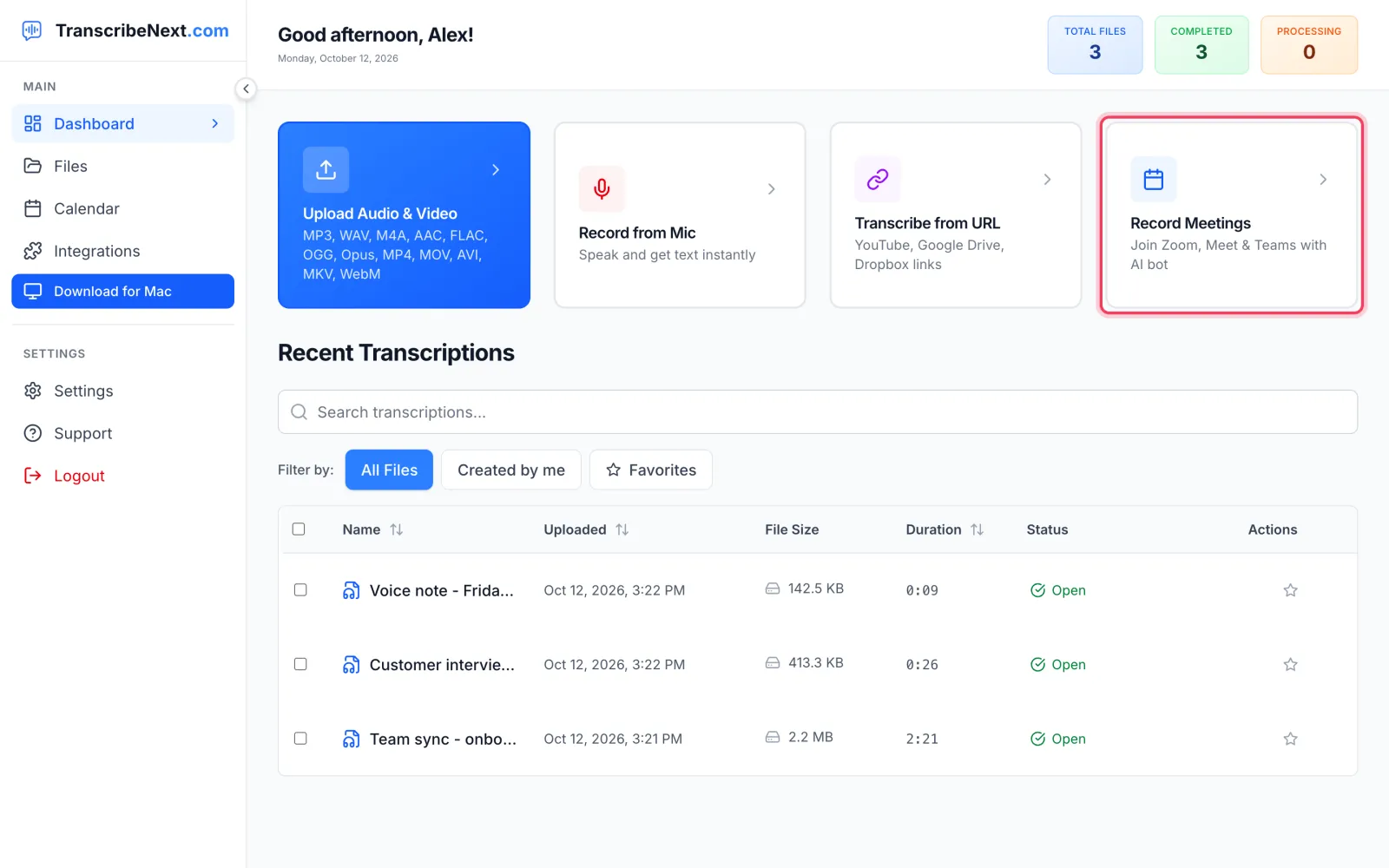
The notetaker is sent from the dashboard (or automatically from your calendar) and appears in the call as a named participant. See how meeting recording works.
After the meeting: rule 12
12. End on time — with decisions, owners and deadlines
Only 17% of meetings mentioned next steps, action items or a recap. In 4.8%, someone said they had a "hard stop", had to "jump off", or that the meeting was "over time" — usually a sign that the end of the meeting was not planned.
Stop five minutes before the end and say three things out loud:
1. What we decided. "We ship pricing B on 1 December."
2. Who does what, by when. "Maria updates the page by Friday; Tom tells support on Monday." Every action needs one owner — "the team" is not an owner.
3. What happens next. "We check results in the Thursday sync."
Saying it out loud matters more than it sounds. A recap that only exists in the host’s head cannot be found later — not by the people who were there, not by people who missed the call, and not by an AI. Here is what happens when you ask an AI notetaker for the action items of a meeting where nobody said them:
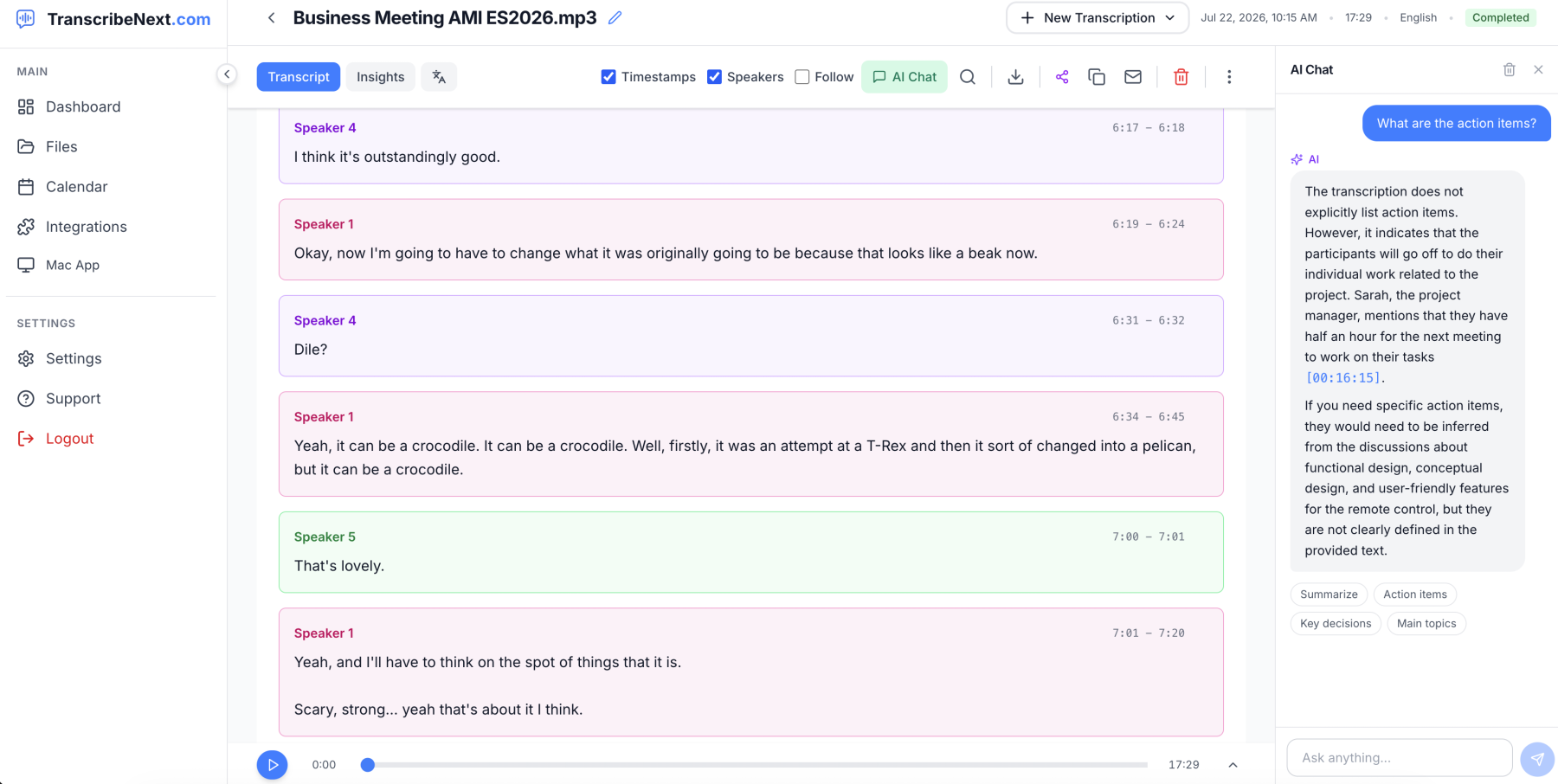
The AI is being honest: if a meeting never assigns tasks, there are none to find. Thirty seconds of spoken recap fixes that for people and software alike.
Then send the written recap within 24 hours, in the channel where the work happens: decisions, actions with owners and dates, open questions. If you transcribe your meetings, the AI summary gives you a first draft to edit rather than a blank page — and the transcript is there for anyone who needs the exact words. We explain why the exact words matter, and how quickly memory of a meeting fades, in why your brain forgets 90% of meetings.
Virtual meeting norms: write them down once
The rules above work best when nobody has to guess them. Virtual meeting norms are simply your team’s etiquette, written down. One page is enough. A starting template you can copy and edit:
| Length | 25 or 50 minutes by default, so people get a break between calls. |
| Agenda | Every meeting has a goal in the invite. No goal, no meeting. |
| Start | We start within two minutes of the hour, whoever is there. |
| Cameras | On for meetings of up to 8 people and anything external; optional otherwise. Say if yours is off. |
| Speaking | Raise hand in meetings of 6+. Hosts call on people by name. |
| Chat | Links and quick questions. Anything important gets said out loud. |
| Recording | Announced at the start; transcripts shared only with attendees unless agreed. |
| Time zones | Recurring meetings rotate the inconvenient slot. Invites state the time in each attendee’s zone. |
| Ending | Last 5 minutes: decisions, owners, deadlines. Recap posted within 24 hours. |
| No-meeting time | One agreed block a week with no internal meetings. |
Review the norms every quarter, and audit recurring meetings at the same time: for each one, ask whether it still needs to exist, whether it needs everyone, and whether it could be half as long.
Meeting rules of etiquette for hosts and attendees
Most meeting rules of etiquette apply to everyone, but hosts carry more of them. A quick split:
| Host | Attendee | |
|---|---|---|
| Before | Goal and agenda in the invite; only the people who are needed; links to pre-reads | Read the agenda; test audio; decline if you’re not needed |
| Start | Start on time; state the goal; announce any recording | Join 1–2 min early, muted; say if your camera is off |
| During | Keep time; call on quiet people by name; park side topics | Speak in short turns; leave a beat; use raise hand and chat |
| End | Decisions, owners, deadlines out loud; end on time | Confirm your own action items out loud |
| After | Send the recap within 24 hours | Do what you said; reply to the recap if something is wrong |
What to say in awkward moments
Most etiquette guides tell you what to do and leave you to find the words. These are the words.
| Situation | What to say |
|---|---|
| Someone is talking on mute | “Sam, I think you’re on mute — we missed the last bit.” |
| Someone has noise or echo | “Alex, we’re getting some echo from your side — could you mute while others speak?” |
| You’re running late | Before: “Running 5 min late, please start without me.” After: “Sorry I’m late — catching up from the notes.” |
| Two people start at once | “Go ahead, Priya — then I’ll come in.” |
| Someone is dominating | “That’s really useful — I want to make sure we hear from everyone before we decide. Tom?” |
| You need to interrupt | “Sorry to jump in — just one point before we move on, it affects this decision.” |
| You want to record | “I’d like to record this for notes, shared only with this group. Is everyone okay with that?” |
| The meeting is overrunning | “We’re at time. Let’s take the last item to a quick follow-up — Maria, can you own that?” |
| You have to leave early | At the start: “I need to drop at :45, so could we take item 3 first?” |
| The meeting has no clear outcome | “Before we go — what did we decide, and who’s doing what?” |
Hybrid meetings, time zones and accessibility
Hybrid meetings
A hybrid meeting is a virtual meeting with a room in it, and the room always wins unless someone makes it fair.
Time zones
Accessibility
How we got these numbers
We analysed transcripts of 766 English-language online meetings at least five minutes long, recorded between 23 December 2025 and 24 September 2026: 259 joined by the TranscribeNext notetaker in Zoom, Google Meet or Microsoft Teams, and 507 Zoom cloud recordings uploaded by our users. Guest uploads were excluded.
Limits worth knowing: transcripts contain recognition errors, speaker detection can merge or split voices, and our users are not a random sample of all meetings — they are people who record and transcribe their calls, who may run more structured meetings than average.
The short version
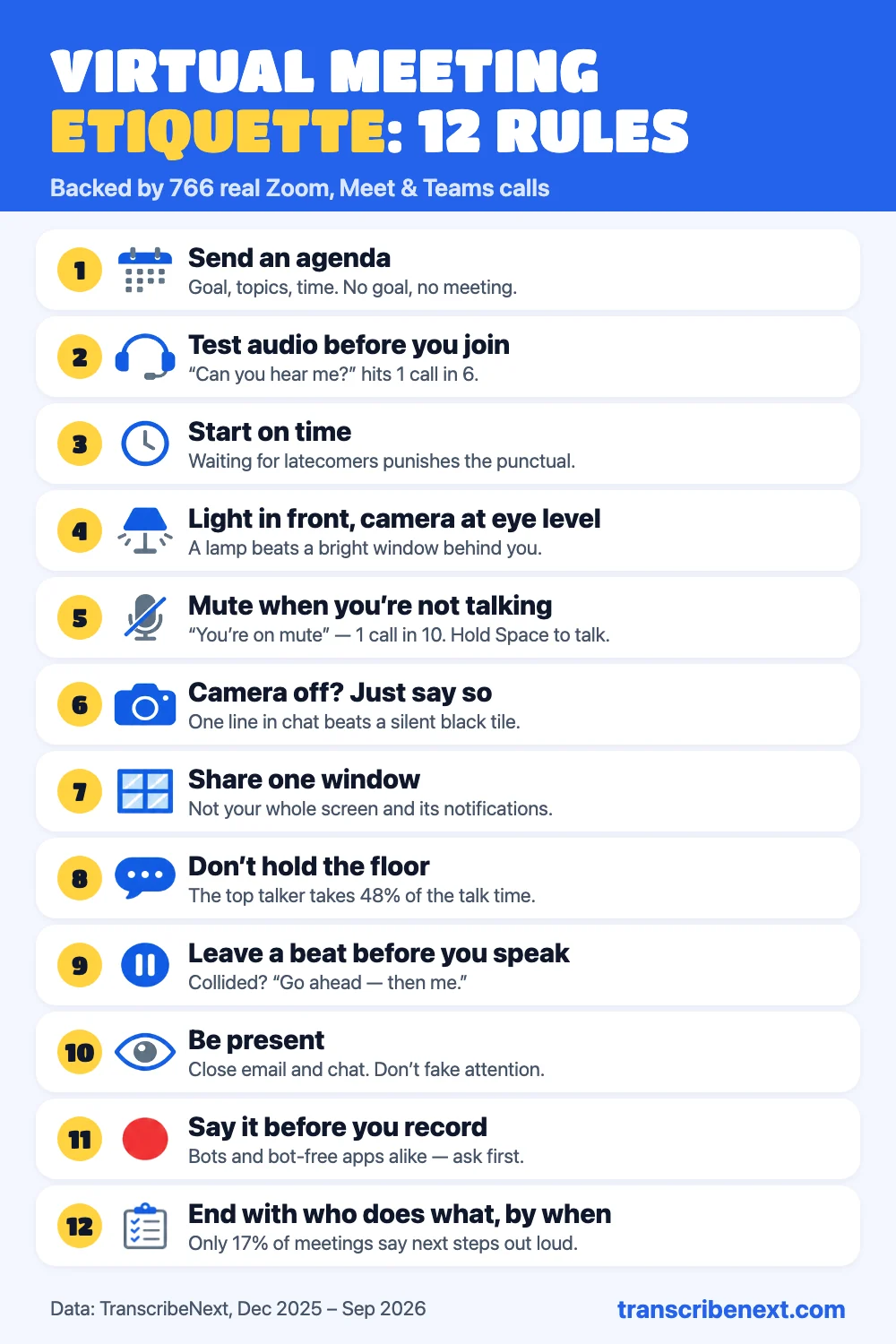
Save or share the cheat sheet — it fits on one screen.
Online meeting etiquette is not about looking polished. It is about removing the friction a video call adds: test your audio before you join, mute by default, say when your camera is off, share one window, keep your turns short, leave a beat, announce any recording, and never end a meeting without saying who does what by when.
If you want the last part done for you, TranscribeNext can join your Zoom, Meet or Teams calls as a visible notetaker — or record from your Mac or Windows desktop without a bot — and turn each meeting into a transcript with named speakers, a summary and action items you can search, share or ask ChatGPT and Claude about. Just remember rule 11 and tell people first.
Frequently asked questions
What is virtual meeting etiquette?
Virtual meeting etiquette is the set of habits that make an online meeting work for everyone on it: joining on time with working audio, muting when you are not speaking, sharing the floor, being honest about recording, and ending on time with clear next steps. It differs from in-person etiquette because a video call strips out most of the cues people normally rely on — eye contact, body language, the small pause that shows someone is about to speak — so things that happen naturally in a room have to be done deliberately online.
What are the basic rules of online meeting etiquette?
Send an agenda, test your audio before joining, join on time, mute when you are not speaking, say when your camera is off, share one window rather than your whole screen, keep your turns short enough that others can speak, leave a beat before you talk, stay present, announce any recording or AI notetaker, and end on time with decisions, owners and deadlines. Those are the 12 rules in this guide.
Is it rude to keep your camera off in a virtual meeting?
Not in itself. What reads as rude is an unexplained black tile in a small meeting where everyone else is on camera. If you need your camera off — bandwidth, a noisy room, eating, a long day of calls — say so in one line at the start, and turn it on for the moments that matter, such as introductions or when you are speaking. Teams should agree a camera norm rather than leave it to guesswork: on for small discussions and anything with external guests, optional for large or listen-only sessions.
How early should you join a virtual meeting?
One to two minutes early for internal meetings and about five minutes early for interviews, client calls or anything you are presenting at. Joining early is not about being seen; it is so audio and screen-sharing problems happen before the meeting rather than during it. In our data, more than half of all ‘can you hear me?’ moments happened in the first five minutes of the call.
What should you do if you are late to a virtual meeting?
Join muted, say one short line in the chat such as ‘Sorry I’m late — catching up from the notes’, and do not ask people to recap what you missed. Wait for a natural pause before speaking. If you know in advance that you will be late, message the host before the start so they do not hold the meeting for you.
Is it okay to record a virtual meeting or use an AI notetaker?
Yes, as long as everyone knows before it starts and can object. Say it out loud at the start — ‘I’d like to record this for notes; is everyone okay with that?’ — rather than relying on the platform banner. A notetaker bot is visible in the participant list, but recording from a desktop app or a phone is not, so it needs an even clearer announcement. Consent rules vary: several US states and most of Europe require the agreement of everyone being recorded. This is a summary, not legal advice.
Can you eat during a virtual meeting?
A drink is fine. A meal is best done with the camera off and the microphone muted, and only in large or listen-only meetings. In a small meeting, or one you are presenting at, eat before or after.
What is the 40/20/40 rule for meetings?
It is a planning rule of thumb: spend about 40% of the effort on preparation, 20% on the meeting itself and 40% on follow-up. It is not based on research, but it makes a useful point that the data in this guide supports — most of what makes a meeting productive happens outside it. Only 14% of the meetings we analysed mentioned an agenda, and only 17% mentioned next steps or action items.
What is the rule of 7 in meetings?
The ‘rule of 7’ comes from Bain & Company’s research on decision-making: once a decision-making group has seven members, each additional person reduces the group’s effectiveness by roughly 10%. It is a reason to keep decision meetings small and to invite everyone else to read the recap instead of attending.
What are virtual meeting norms?
Virtual meeting norms are the written-down etiquette rules a team agrees on, so nobody has to guess. A good set fits on one page and answers: when meetings are scheduled and how long they last, whether cameras are expected, how people ask to speak, how recording and AI notetakers are handled, what goes in the chat, and who sends the recap and by when.
What should you not do in a virtual meeting?
Do not join with untested audio, leave your microphone open in a noisy room, share your whole desktop with notifications on, talk for five minutes without a pause, type loudly while unmuted, record without telling people, or let the meeting run over and end without anyone saying what happens next.