
I spent three months transcribing everything from podcast interviews to court depositions. My fingers hurt. My ears rang. And I made every mistake you can make when learning transcription.
But here's the thing: transcription isn't just typing what you hear. It's a skill. Once I figured out the right approach, my speed doubled and my accuracy hit 98%.
This guide is everything I wish someone had told me before I started. The practical stuff that actually works, no filler.
What Transcription Really Means (And Why It Matters)
Transcription is converting spoken words into written text. That's it. You listen to audio or video and type what you hear. The same is true in any language — for German the mechanics are identical, only the engine differs, and we published which one transcribes German best and by how much. According to Wikipedia, transcription in linguistics refers to the systematic representation of spoken language in written form.
Sounds simple, right? It's not. When I started, I thought I could just hit play and type. Wrong. People talk fast. They mumble. They talk over each other. Background noise makes words disappear.
I've transcribed medical lectures where doctors used terms I'd never heard. I've done legal depositions where every "um" and pause mattered. Each type needs a different approach.
The work shows up everywhere. Researchers need interview transcripts for studies. Lawyers need deposition records. Content creators need YouTube captions. Journalists need quotes from interviews. The demand is real.
Why I Got Into This (And Why You Might Too)
I started transcribing because I needed flexible work. I could do it at 2 AM in my pajamas. No commute. No boss looking over my shoulder.
The pay varies wildly. Some platforms pay $15 per audio hour. Others pay $60 or more for specialized work. When I got fast enough to transcribe an hour of clear audio in 2-3 hours, the math started working.
But money aside, I learned something unexpected: transcription makes you a better listener. You catch details most people miss. You notice speech patterns. You become obsessed with accuracy in a way that bleeds into everything else you do.
The Tools You Actually Need
Let's talk equipment. I started with my laptop's built-in keyboard and free software. Big mistake.
A decent keyboard matters. My hands cramped after an hour on my laptop keyboard. I switched to a mechanical keyboard with good key travel. The difference was immediate - my typing speed increased and my hands stopped aching after long sessions.
Headphones, not earbuds. I burned through three pairs of cheap earbuds before investing in over-ear headphones. You need to actually hear subtle differences in sound. Earbuds don't cut it when you're listening for hours straight.
Foot pedals change everything. This was my best investment. A USB foot pedal lets you control playback without taking your hands off the keyboard. Play, pause, rewind - all with your feet. My efficiency jumped 30% when I finally got one.
Software: I tried everything. Express Scribe is free and works. Dragon NaturallySpeaking helps but costs money. Transcription software with hotkeys beats working in a basic text editor by a mile.
But here's what really changed things for me: I found TranscribeNext. Automatic transcription that actually works. More on that later.
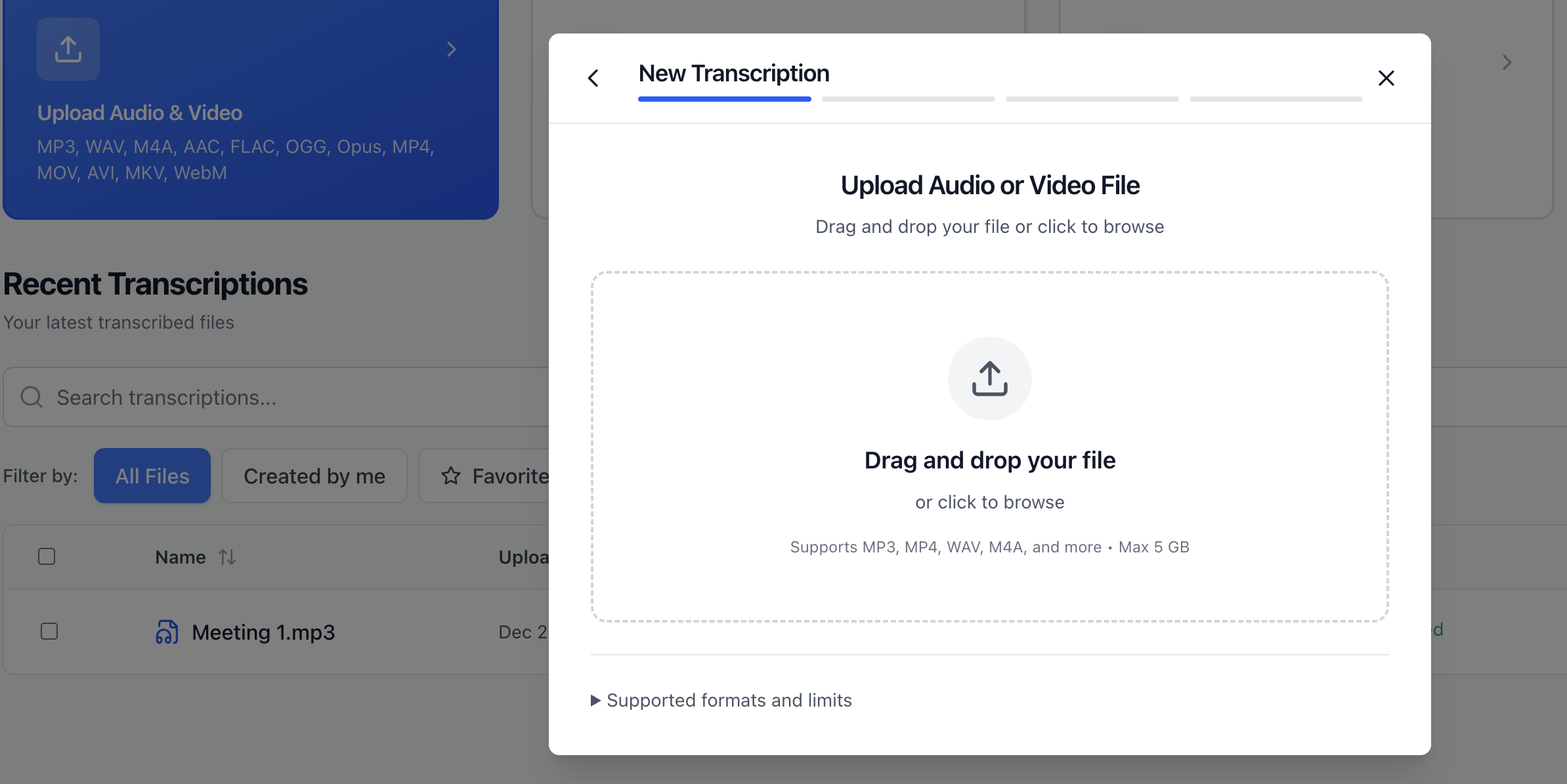
*The TranscribeNext upload screen - clean and straightforward*
What a free tier will and won't do for you
Worth checking before you build a workflow around any tool, because "free" means very different things.
TranscribeNext's free plan gives you 3 files a day and a 5-minute transcript preview of each — enough to judge the quality on your own audio, not enough to finish a long interview. Files are capped at 50 MB, with 150 MB of storage.
The paid tiers drop the preview and raise the throughput: Plus allows 20 files a day at up to 5 hours and 2 GB each; Premium is unlimited files a day at up to 8 hours and 5 GB, with 1 TB of storage.
The number that actually decides things is files per day rather than minutes. If you work in bursts — a day of interviews, then nothing for a week — a daily cap bites harder than a monthly minute allowance would.
How to Do Transcription: My Step-by-Step Process
Here's my exact workflow after months of trial and error.
First, I listen to the entire file without typing. Just listen. Get a feel for the speakers. Note problem areas. Mark timestamps where audio quality drops. This preview saves time later.
Set up your workspace right. Split screen. Audio player on one side, document on the other. Keep a notes doc open for questions or unclear sections. I keep a style guide visible for quick reference.
Start with timestamps. I insert a timestamp every 30-60 seconds as I work. If I need to go back later, or if the client has questions, timestamps are lifesavers. Format them consistently: [00:01:35] works for me.
Type in chunks, not real-time. Play 10-15 seconds. Pause. Type what you heard. Rewind if needed. Repeat. Trying to type while audio plays leads to errors. Your brain can't process and type simultaneously at full accuracy.
Use shortcuts obsessively. My foot pedal handles playback. But I also use text expansion shortcuts. "int" expands to "interviewer." "res" becomes "respondent." These seconds add up over hours.
Flag problem spots immediately. When I can't understand something, I type [INAUDIBLE - 0:15:23] and move on. Coming back with fresh ears helps. Spending five minutes on one unclear word kills momentum.
Do multiple passes. First pass: get everything down roughly. Second pass: fix obvious errors and fill gaps. Third pass: polish formatting and check consistency. Trying to perfect everything on the first pass slows you down.
The Manual vs Automated Reality Check
I have strong opinions about this after doing both.
Manual transcription gives you control. You catch every nuance. You understand context. For legal work, medical records, or anything requiring 100% accuracy, manual wins.
But manual is slow. Even when I got fast, an hour of clear audio took me 3-4 hours to transcribe perfectly. Complex audio with multiple speakers? 6-7 hours per audio hour.
Automated tools have gotten scary good. I resisted them for months. "They're not accurate enough," I told myself. Then I tried TranscribeNext on a podcast episode.
The AI got 95% of words right. It identified different speakers. It even handled technical jargon better than I expected. I spent 30 minutes cleaning up what would have taken me 3+ hours manually.
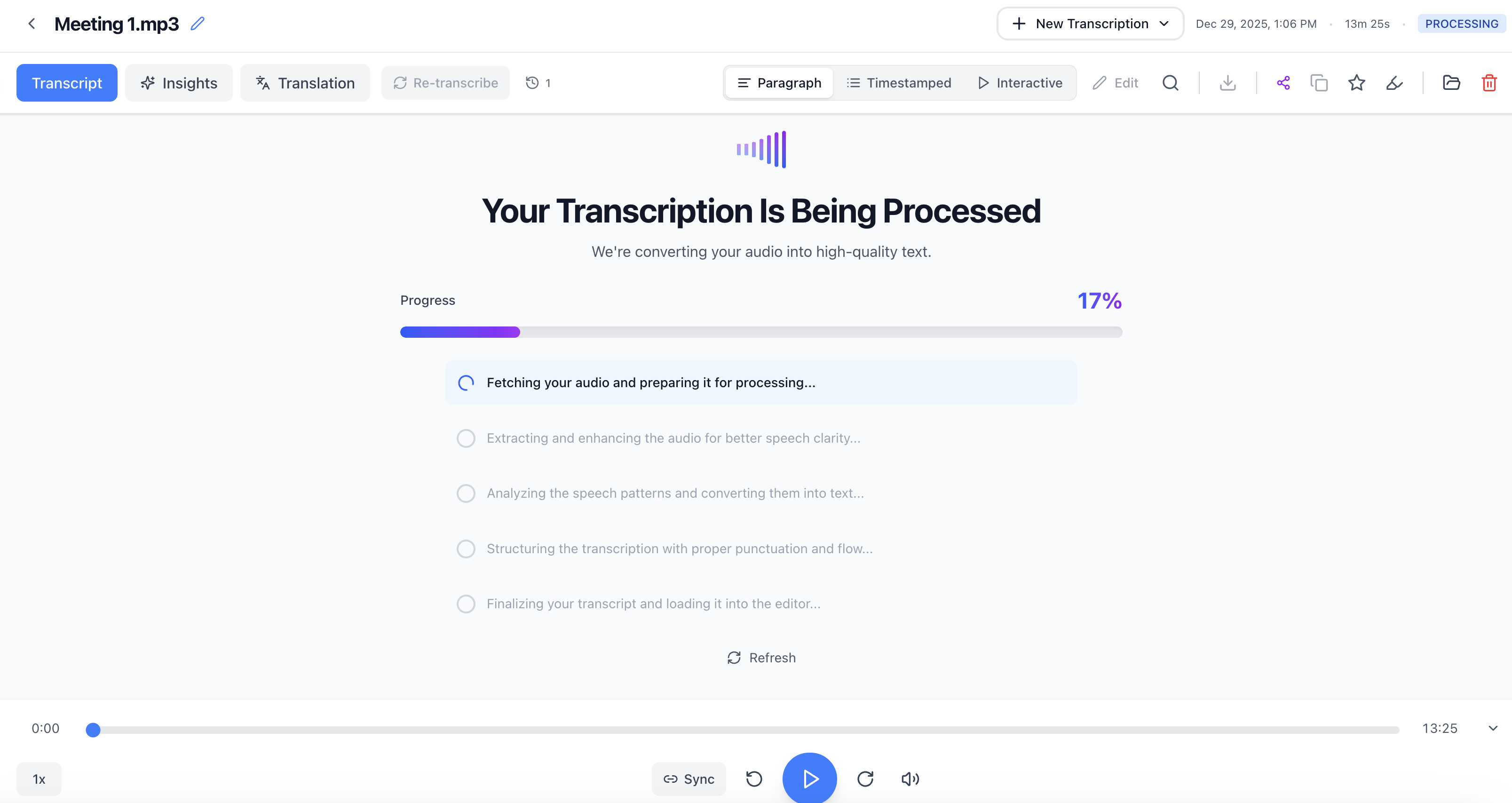
*TranscribeNext automatically identifies speakers while transcribing*
Now I use a hybrid approach. For straightforward content, I run it through TranscribeNext first. Then I edit the output. This cuts my time by 60-70% while maintaining high accuracy.
For specialized content—medical, legal, academic—I still go manual. The stakes are too high for errors. But for content creation, interviews, and general business use, automated transcription changed how I work.
Every Mistake I Made (So You Don't Have To)
Not learning keyboard shortcuts early. I wasted weeks clicking menus. Learn your software's hotkeys immediately. Make it muscle memory.
Trying to transcribe at full audio speed. You can't. Even if speakers talk slowly, you need time to type and process. I play audio at 80-90% speed for best results.
Skipping the preview listen. I'd dive right in, then discover 10 minutes in that audio quality was terrible or speakers had thick accents. Preview saves headaches.
Not taking breaks. Transcription exhausts your brain differently than other work. Your ears get fatigued. Your concentration drops. I now take a 10-minute break every hour. Non-negotiable.
Inconsistent formatting. My early transcripts were a mess. Sometimes I wrote out numbers, sometimes I used numerals. Speaker labels varied. Create a style guide and stick to it.
Trusting spell-check blindly. Spell-check doesn't know technical terms. It suggests wrong words that sound right. "Genetic markers" became "genetic markets" once. Always proofread.
Not using text expansion. Typing the same phrases repeatedly kills time. Set up shortcuts for common words and phrases in your niche.
Working in silence. Background noise at home made me miss words in the audio. I use noise-canceling headphones now, but I also work in a quiet space.
How to Format Your Written Transcript Properly
Format matters more than you think. A wall of text is useless. Clean formatting makes transcripts readable and professional.
Speaker labels are non-negotiable. Every time someone talks, label it. I use "Interviewer:" and "Respondent:" for interviews. For panels, I use names if known, or "Speaker 1," "Speaker 2" if not.
Paragraph breaks help readability. Don't let one speaker's turn go on for pages. Break at natural thought shifts. I aim for 3-5 sentences per paragraph max.
Timestamps depend on the use case. Legal transcripts need frequent timestamps. Content transcripts might need them only at major topic shifts. Ask your client or decide based on purpose.
Verbal tics require judgment. In verbatim transcripts, include every "um," "uh," and "like." For clean transcripts, remove them. Know which type you're creating before you start.
Unclear audio needs notation. I use [inaudible], [crosstalk], [background noise], or [unclear] depending on the issue. Include timestamps so others can review if needed.
Speaker identification matters. If you can identify speakers by name, do it. If not, stay consistent with your labels throughout the document.
My standard format looks like this:
```
Interviewer [00:00:15]: Can you describe what happened that day?
Respondent [00:00:18]: Well, I woke up around 6 AM. The weather was [unclear] but I decided to go anyway.
Interviewer [00:00:25]: And what time did you arrive?
```
Clean. Consistent. Easy to reference.
Document Transcription: Different Types Need Different Approaches
Not all transcription is the same. Each type has specific requirements.
Verbatim transcription includes everything. Every "um," every pause, every false start. Legal and academic work often requires this. It's exhausting but necessary when exact wording matters.
Clean transcription removes filler words and cleans up grammar while keeping the meaning intact. Most business and content work falls here. It's faster and more readable.
Intelligent transcription goes further. You fix grammar, remove repetition, and organize thoughts coherently. This is editing as much as transcription. Podcasters and content creators love this, but it takes longer.
I've done all three types extensively. Verbatim takes longest but requires less judgment. Intelligent transcription is faster to type but requires more mental energy to do well.
Medical transcription needs specialized knowledge. Drug names. Procedures. Anatomy terms. I won't pretend to be an expert here. This field requires training I don't have — the Association for Healthcare Documentation Integrity (AHDI) offers certifications for those serious about this specialty.
Legal transcription demands perfect accuracy. Court reporters get certified for a reason — the National Court Reporters Association (NCRA) sets industry standards. If you're doing legal work, understand the responsibility. Errors can affect cases.
Interview transcription is what I do most. Podcasts, research interviews, focus groups. The goal is capturing ideas and quotes accurately. I balance verbatim accuracy with readability.
How to Write a Transcript That People Actually Use
A transcript sitting in a folder helps nobody. Good transcripts get used. Here's what makes them useful.
Table of contents for long files. If your transcript runs more than 10 pages, add a simple contents list at the top. Main topics with timestamp ranges. Takes 5 minutes and makes the document infinitely more navigable.
Search-friendly formatting. People need to find specific information fast. Consistent speaker labels help. Clear paragraph breaks help. Descriptive headers help if the content allows for them.
File naming that makes sense. I learned this the hard way after losing files. Use: Date_ProjectName_FileType. Example: 2024-03-15_TechPodcast_Transcript.docx. Obvious and sortable.
Multiple format options. I deliver transcripts as .docx files for editing, .pdf for final versions, and .txt for maximum compatibility. Costs me nothing and clients appreciate the flexibility.
Highlight key quotes or insights. If I'm transcribing an interview and hear something particularly important, I'll bold it or add a note. This isn't always appropriate, but for content work it adds value.
The goal is usability. Your transcript should save people time, not create more work.
Time Management: How Long Does Document Transcription Actually Take?
Every beginner asks this. The answer frustrates them: it depends.
Clear audio with one speaker? I can transcribe at a 3:1 ratio. One hour of audio takes me three hours to transcribe fully and proof. That's at my current speed after months of practice.
Multiple speakers with crosstalk? 5:1 or worse. Heavy accents or technical jargon? Add another hour per audio hour.
When I started, my ratio was 6:1 for simple files. Everything took forever. Speed comes with practice, but it takes longer than you expect.
Using TranscribeNext changed my math completely. Upload audio, get a draft transcript in minutes. Spend 30-45 minutes editing instead of 3-4 hours transcribing from scratch. For straightforward content, my ratio dropped to 1:1 or better.
This matters for pricing work. If you're charging per audio hour, you need to know your actual hours. If you're charging per project, understand your time investment before committing.
Here's my honest breakdown:
Your speed will differ. Track your time early on. Know your numbers.
Getting Paid: What Transcription Work Really Pays
The pay scale is all over the place.
Entry-level platforms like Rev or GoTranscript pay $0.30-$0.60 per audio minute. That's $18-$36 per hour of audio. If you're fast and transcribe that hour in 3 hours, you're making $6-$12 per hour. Not great.
Direct clients pay better. I've gotten $1-$2 per audio minute for specialized work. That's $60-$120 per audio hour. Same 3-hour transcription time means $20-$40 per hour of your actual time. Much better.
Specialized fields pay most. Medical and legal transcription, with proper training, can hit $25-$40 per hour of work time. But you need certifications and experience.
My advice: Start on platforms to build speed. Then find direct clients. Market yourself to podcasters, researchers, or small businesses. Cut out the middleman.
I started on Rev making pennies. Now I work with regular clients who pay $75-100 per audio hour. The difference is night and day.
Using TranscribeNext made me more competitive. I could take on more work without sacrificing quality. I could offer faster turnaround. Clients loved that.
The Skills Nobody Mentions
Beyond typing speed and good ears, transcription taught me unexpected skills.
Attention to detail became automatic. I notice errors everywhere now. Typos in menus. Mistakes in signs. It's annoying but useful in other work.
I got good at research fast. Unknown term in a transcript? Find it quickly or slow down. I learned to Google efficiently, cross-reference sources, and verify spelling.
Time management improved. Transcription forces you to estimate accurately. Miss your estimate and you work for free. I got realistic about my capabilities fast.
Software adaptability increased. Every client wants different formats and tools. I learned to adapt quickly. Pick up new software fast. Figure out workarounds.
Communication skills sharpened. When audio is unclear, you sometimes need to ask the client for clarification. Writing professional, specific questions is its own skill.
These skills transfer. They're valuable beyond transcription work.
My Current Workflow (After Everything I Learned)
Here's exactly how I work now.
Morning: Upload to TranscribeNext. I batch upload files for the day. While AI processes them, I do other work. No point sitting idle while software does its thing.
Mid-morning: First edit pass. Download the automated transcripts. Do a quick pass fixing obvious errors. Speaker labels. Formatting. Major mistakes.
Afternoon: Deep edit with audio. Listen to the audio while reviewing the transcript. Fix subtle errors. Verify unclear sections. Add timestamps if needed.
Late afternoon: Format and deliver. Final polish. Check formatting consistency. Export to required formats. Send to client with a quick summary.
This workflow lets me handle 4-5 hours of audio per day while maintaining high quality. Before TranscribeNext, I could barely manage 2 hours of audio daily.
The key was accepting that AI helps but doesn't replace judgment. I still listen to everything. I still catch errors. But I'm not starting from a blank page.
Tools That Actually Helped Me Scale
Beyond TranscribeNext, a few tools made real differences.
Grammarly catches typos I miss. It's not perfect for transcription (it tries to "fix" correct but conversational language), but it catches genuine errors.
Text expansion software (I use aText on Mac) saves thousands of keystrokes daily. Common phrases become shortcuts. Medical terms I use frequently expand automatically.
Evernote for client notes and style guides. Each client gets a note with their preferences. I reference it before starting their work.
Google Sheets for tracking time and earnings. I log every file. Audio length, time spent, pay rate, client name. This data helps me price new work accurately.
Focus timer apps keep me on schedule. I use the Pomodoro technique: 50 minutes work, 10 minutes break. Transcription quality drops fast when you push through fatigue.
Backup software because losing work once taught me that lesson permanently. Everything saves to cloud storage automatically.
When Automated Transcription Fails (And What to Do)
TranscribeNext is good. Really good. But it's not magic.
Heavy accents still cause problems. Multiple speakers talking over each other confuse the AI. Technical jargon in niche fields sometimes gets transcribed wrong.
Poor audio quality defeats even the best software. If the source audio is terrible, automated transcription struggles.
When AI fails, I don't fight it. I switch to manual transcription for that section. Hybrid approaches work best. Use automation where it helps, go manual where it doesn't.
I had a file last month—research interview with a professor who had a thick accent discussing complex medical research. TranscribeNext got maybe 60% right. I spent more time correcting it than I would have spent just transcribing manually.
Lesson learned: preview the audio quality and accent difficulty before deciding on automated vs manual approach. Some files aren't worth running through AI first.
The Ethics of Accuracy
This matters more than people think.
Transcripts become records. They're quoted. Referenced. Used in legal proceedings. Published. Your accuracy affects real outcomes.
I've seen transcription errors change meanings. Misheard words that flipped the sense of a statement. Missed negations that reversed someone's position.
This responsibility weighs on me. Every transcript I deliver, I ask myself: is this accurate enough to be reliable?
I follow these rules:
Getting paid for transcription isn't just about speed. It's about being trustworthy. Clients come back to transcribers they can rely on.
Real Talk: Is Transcription Worth It as Work?
Depends what you want.
If you need flexible, work-from-home income, transcription delivers. The barrier to entry is low. You can start with minimal investment.
If you want to get rich, look elsewhere. Even fast transcribers with good clients hit a ceiling. There are only so many hours you can transcribe per day before your brain turns to mush.
For me, transcription was a stepping stone. It paid bills while I built other income streams. It taught me discipline and attention to detail. Those lessons stick with me.
But I'm honest with people who ask: this is harder work than it looks. Your hands will hurt. Your ears will ring. You'll dream about typing.
The people who succeed at transcription are detail-oriented, patient, and disciplined. If that's you, the work is there.
What I Wish I'd Known Day One
Looking back, I would tell myself:
Invest in proper equipment immediately. That keyboard. Those headphones. The foot pedal. Don't wait weeks like I did.
Take the work seriously from the start. Build good habits early. Establish a consistent workflow. Don't develop bad practices you'll need to unlearn later.
Find your niche. I wasted time doing general transcription when I should have specialized sooner. Find a type of content you understand and enjoy, then get known for that.
Use technology without depending on it completely. Automated tools help immensely. But they don't replace skill and judgment. Find the balance.
Track everything. Time spent, money earned, client preferences, common errors you make. Data helps you improve faster than intuition alone.
Take care of your hands and ears. Stretch your hands regularly. Take breaks. Keep audio at reasonable volumes. This work can cause repetitive strain injuries if you're not careful.
Where I Am Now (And Where This Could Take You)
I still do transcription work, but differently than when I started.
I have a handful of regular clients who value quality and fast turnaround. I charge premium rates because I deliver premium results. TranscribeNext lets me handle more work without sacrificing accuracy.
The skills I developed—attention to detail, time management, efficient research—transferred to other writing work. I'm pickier about transcription projects now because I can be.
For someone starting out, transcription remains a solid option. The work exists. The skills are learnable. With tools like TranscribeNext, the time investment is more reasonable than it used to be.
But go in with open eyes. This isn't passive income. It's real work requiring focus and skill. If you're willing to put in the effort, you can build something sustainable.
The Bottom Line
After 500+ hours of audio transcribed, here's what matters:
Get the basics right. Good equipment. Proper workspace. Efficient software. These aren't luxuries - they're requirements if you want to do this work without wanting to quit after a week.
Accept that speed comes slowly. You will be terrible at first. That's normal. You'll get faster, but it takes months of actual practice, not weeks.
Use technology smartly. Tools like TranscribeNext changed how I work. But technology assists - it doesn't replace the fact that you still need to actually listen and catch errors.
Build relationships with clients. Direct clients pay way better than platforms. Deliver quality work, communicate clearly, and they'll keep coming back.
Know when to say no. Some files aren't worth your time at the offered rate. Some clients are more headache than they're worth. Once you build experience, you can be pickier.
Take care of yourself. This work is harder on your body than you think. Breaks matter. Ergonomics matter. Your health matters more than any transcript.
Transcription isn't glamorous. Nobody dreams about spending hours typing what other people say. But it's honest work that pays bills and teaches you valuable skills - attention to detail, time management, research efficiency.
I started knowing nothing. Made every mistake. Wasted time and money figuring things out. But I got there. You can too.
Whether you're looking for side income, a full-time thing, or just trying to transcribe something for a one-off project, the principles stay the same. Listen carefully. Type accurately. Format clearly. Use good tools. Stay patient.
That's how you do transcription. Everything else is details.
To go further: supported audio and video formats lists what you can feed in, timestamped transcription covers time-coded output, and the SRT timestamp format reference explains subtitle timing. To work offline, there is a transcription app for Mac.